REAL Design — for real LIFE MOMS.
Designers have a method.
Nobody teaches it.
Until now.
You've followed the advice. You've saved the pins. You've watched every video and tried every hack short of hiring someone to come do it for you. And your rooms still don't feel the way you want them to.
It's not your taste.
It's not your budget.
It's that nobody ever gave you the actual framework.
The One Room Transformation System teaches you the thinking process designers use — rebuilt from the ground up for moms, real budgets, and real life.
You already know this feeling.
You found the perfect inspiration photo. You tracked down the exact rug. You measured twice, ordered with hope, rearranged everything — and it still didn't look the way it did in the photo. Not even close.
So you told yourself you must have missed something. You went back to Pinterest. You watched more videos. You saved more posts. You opened 14 more tabs. An hour later you felt more confused than when you started, and somehow — impossibly — more behind.
And while you were doing all of that, the room stayed exactly the same.
Half-finished.
Making you tense every time you walk through it. A low-grade weight at the back of your mind, right alongside the grocery list and the permission slip you still need to sign.
Maybe you finally committed — to the sofa, the paint color, the rug — and then you lived with the quiet, sinking disappointment of realizing it still wasn't right, and you have no idea why.
Maybe you've been stuck on one decision for so long that the whole project has stalled. Again.
Maybe you've tried to bring in a professional — walked into a showroom, reached out to a designer — and immediately felt the gap. Your budget, your practical needs, your desire to stay in control of your own home. And you left feeling like beautiful spaces are for someone else. Someone with a simpler life and an easier number to spend.
But you're not just bothered by the room.
You know that environments shape people.
You've read enough, watched enough, felt enough in your own body to know it's true.
A space that feels chaotic creates chaos. A space that feels calm creates calm.
And your home — the one where every sick day happens, every movie night, every ordinary Tuesday — isn't the space you want to raise them in yet.
That's not a small thing. That's the thing. And you're carrying it alone.
Somewhere underneath all of it is a quieter fear: that other women just know how to do this, and you don't, and maybe that means something about you.
It doesn't.
And I want to tell you exactly why.
You haven't been failing at design.
You've been trying to design without the ONE thing that makes any of it actually work — A METHOD.
Here's what nobody tells you:
Design isn't a talent you're born with.
It's a thinking process — a sequence of decisions that every professional designer follows — and almost none of them explain it.
So you've been collecting inspiration with no framework to use it.
Making choices with no criteria to guide them.
Walking away disappointed, over and over, not because you lack the eye but because you were never given the structure.
But here's the part that changed everything for me when I finally understood it:
The things that make someone good at design?
You're already doing them:
✔️ Reading emotional nuance.
✔️ Anticipating needs before anyone asks.
✔️ Managing logistics across a dozen moving parts.
✔️ Knowing — just knowing — when something is off.
✔️ Creating the atmosphere your family needs for bedtime, for homework, for the hard days.
That's not "mom stuff." That is design. That is exactly what design is.
You haven't been missing the talent.
You've been missing the framework to use what you already have.
By the end of this, you will:
A complete design plan for your room. Every decision made — not vague ideas, but real product selections that fit your family, your budget, and your specific space. Documented, organized, and ready to execute.
A decision-making process you trust. Not "I hope this works." Actual clarity. You'll know exactly why you're choosing what you're choosing — and you'll never need to cross your fingers and order something again.
The ability to see what's wrong — and fix it. Not just a feeling that something is off, but the specific reason and the specific solution. That shift is permanent. You can't un-have it, and it works on every room for the rest of your life.
A room that feels like your family lives there. Not a copy of someone else's inspiration board. Something that could only ever be yours — because it was built around who your family actually is.
The satisfaction of saying "I designed this" — and meaning it. The people who walk into your home are going to notice. And for the first time, you're going to be the one getting the texts asking for advice.
I'm Alyssa, founder of Real-Life Design
And I know all of this because I was you.

I once spent four months trying to choose a rug. Four months riddled with anxiety — comparing, second-guessing, researching, abandoning, and starting over. When I finally bought it, I was so relieved — until it arrived. It didn't look the way I thought it would. Nothing I'd bought seemed to work with anything else. The rooms never felt cohesive, no matter how carefully I chose each individual piece. And I couldn't figure out why, because no one was talking about that part.
So I enrolled in design school. Of course life didn't slow down for that decision — we were moving internationally and soon after that I was pregnant with my fourth — so I only made it through half the program. But what I learned was enough to change everything. I finally understood the underlying principles. The why behind every decision. And something clicked that I can only describe as irreversible.
The results were almost immediate.
I started impressing every person who walked through my door — with low-budget furniture, rental restrictions, and the limitations of living overseas. My parents — the same ones who once told me design wasn't a real career — did a complete 180. They now consult me before making a single design decision for their second home, a project I've nearly designed in full.
Since buying our first home, I've designed and fully implemented our bathroom renovation, our nursery, and our outbuilding. Here's what still amazes me about every single one: the design phase took a few hours. Not weeks of spiraling. Not months of returning things. Hours. A complete, cohesive plan that directed the whole execution — with clarity, without a single moment of second-guessing.
I figured out a method.
And once I had it, it worked every single time — even exhausted, even stretched thin, even with a tight budget and a very full life.
That's why I built Real-Life Design.
✖️ Not to hand you my taste.
✖️ Not to push a look or a style or a product I like.
But to give you the framework that finally makes your own taste usable — that turns the skills your already have into something you can actually build with.
What's inside:
The One Room Transformation System walks you through the full Real-Life Design Method — the same process professional designers follow, rebuilt from the ground up for moms, real budgets, and the pockets of time between everything else.
You'll work inside your Toolkit: a set of visual, Google-based workbooks where your ideas stop being a swirl in your head and become something real on the screen. You can work in it any time, from anywhere, without downloading a single thing.
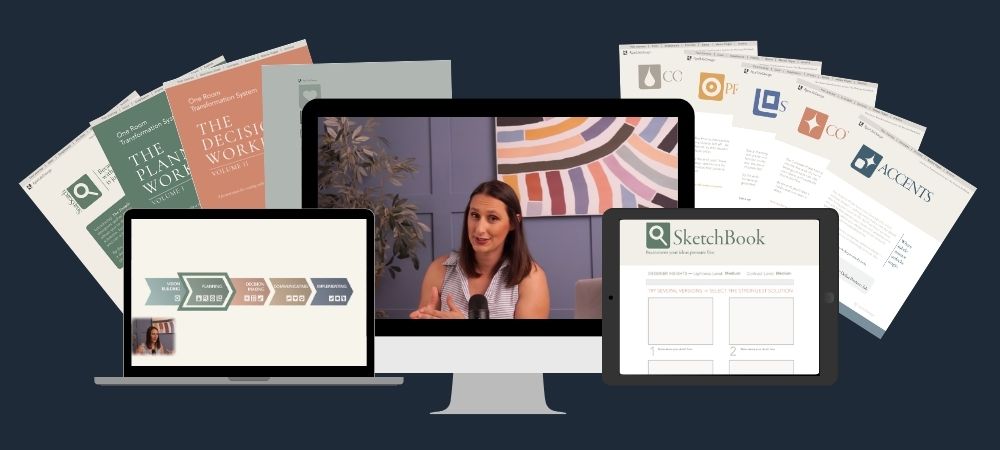
(You'll want a laptop or desktop for this — it's where the process feels calm and precise. The workbooks technically run on an iPad, but they're fiddly. On a phone, they become frustrating fast. A real screen makes the whole thing feel manageable.)
Here's how it unfolds:
MODULE 1 — VISION BUILDING
Before you pick a single product, you'll define the emotional job of your room: how you want it to feel, how your family actually moves through it, what's creating friction in your daily routines, and what your real constraints are. This becomes the compass for every decision that follows — and it's what keeps you anchored when you'd otherwise drift toward whatever's on sale or whatever you saw on Instagram last night.
Tools: Vision Building Session, Design Brief, AI Prompts
MODULE 2 — PLANNING
This is where overwhelm disappears. You'll translate your vision into an actual, usable plan — your color direction, a tool called SnapSearch that teaches you to use inspiration the way designers actually do (as a problem-solving tool, not a chaos machine), your room's visual priorities, and your layout logic. By the end of this module, you've eliminated most of the decisions you'd otherwise agonize over. Your plan does the filtering for you.
Tools: Planning WorkBook, SnapSearch Tool, AI Prompts
MODULE 3 — DECISION MAKING
Now you make every call. Furniture, surfaces, layout, lighting, textiles, accessories — all of it, in a structured sequence that means nothing falls through the cracks and nothing is guesswork. You'll use your plan as a filter and your workbook as a canvas. You'll see your options and combinations before you commit to them. And you'll arrive at a complete list of real products, at your real budget, that you know work together — before you spend a dollar.
Tools: Decision WorkBook, Selections Sheet
MODULE 4 — COMMUNICATING + IMPLEMENTING
You'll pull everything into a clean, shareable design presentation: your full plan, your product selections, your decisions — documented and organized in one place. This is what you show your partner when they ask what you're thinking. What you hand a contractor when you're ready to move. What you come back to six months from now when you're ready for the next room.
Tools: Project Pack
Everything is step‑by‑step, emotionally safe, and designed to flex with your real life - whether you have five minutes or a full afternoon.
What to expect:
The full course is about 4.5 hours — 1 hour 36 minutes of teaching, and just under 3 hours of real-time demos where you can watch the complete design process unfold on an actual room, from blank slate to finished plan.
The teaching videos are short and focused — built for 15 to 20 minute windows between school pickups and bedtime. You can pause, rewind, and come back without losing your place.
The demos are designed to be worked alongside your own project — watch a step, then do that step in your own workbook before moving on. That's the mode that produces the best results. If you'd rather watch the full process unfold before you start, that works too. Either way, you're not watching someone else's design happen to them. You're learning by seeing the thinking in real time.
You can move quickly on the days you have a block of time, or in five-minute pockets on the days when that's genuinely all you have. The method flexes to your real life. That's not a marketing phrase — it's literally how it was designed.
No design background needed. No prior experience with any of the tools. Just a laptop, an internet connection, and a room you're ready to stop walking past.
Your investment:
$97
(ONE-TIME)
Hiring a designer costs $1,500–$8,000 for ONE ROOM.
And when you do, you hand your project over to someone who has never lived your life, doesn't know your family, and may care more about how the room photographs than how your mornings actually feel. The budget conversations are awkward. The control is gone. And you're paying for an outcome you didn't fully participate in.
This gives you the same quality of thinking — for a fraction of the cost — and you stay in the driver's seat for every single decision.
You’ll get immediate access to:
-All 4 modules and every video (4.5 hours total)
-The full Toolkit — Vision Building Session, Design Brief, Planning Workbook, SnapSearch Tool, Decision Workbook, Selections Sheet, and Project Pack — all built in Google, ready to use from any browser
-AI Prompts at every phase where they actually help — to replace some of that design school knowledge and remove some of the heavy lifting — while keeping things human where they need to be.
-Lifetime access to this course and all future updates and improvements to the One Room Transformation System — every refinement, every new lesson, everything that makes this version better.
This is the lowest this price will ever be.
You're here at the founding — and your experience with this course will directly shape how it grows. Every improvement, every addition, every future update comes to you automatically. As a founding student, you get all of it for the price you paid today.
The Real-Life Guarantee:
IIf it's not the right fit, email me within 30 days for a full refund. No guilt, no hoops, no hard feelings.
You either feel the method working — or you don't pay for it. That's the deal.
Frequently Asked Questions:
Are there testimonials from other students?
I'm going to be straightforward with you: this is an MVP — a first release — and there are no student testimonials yet. What exists is my own documented track record: spaces designed across multiple countries and multiple homes, a method that takes a full design project from blank slate to complete plan in a matter of hours, and a personal network that won't make a design decision without consulting me first — including my parents, who once told me design wasn't a real career. The founder price reflects where we are in this launch. The method is complete, it works, and the students who go through it first are the ones who shape everything that comes next. If being first makes you hesitate, that's fair — and the 30-day guarantee means there's no risk to finding out.
Do I need design experience?
None. The Real-Life Design Method was built specifically for the person who feels like she doesn't "have the eye" — because that feeling is about training, not talent. Every step is explained, every tool is walked through, and you will never be left staring at a blank page wondering what to do next.
How much time will this take?
The teaching videos are short and modular — 15 to 20 minutes each, built for real pockets of time. The actual design work scales with your room's scope and complexity. A simpler project with clear constraints moves faster. A larger or more complex room takes longer — and if you dive in and realize there's more to work through than you expected, that's not the method failing. That's the method working. What changes isn't the time — it's what your time produces. Instead of hours of spiraling that leave you more confused than when you started, you're making real, documented progress toward a finished plan. The method makes your time efficient. It can't make design itself instant.
What if my room is small, awkward, or weird?
That's where this method is most useful. The process teaches you how to think through design — not what to buy for a generic room. Your constraints aren't obstacles to the process. They're part of the brief.
What if I don’t have a big budget?
The method is built around your real budget — whatever it is — without judgment. You'll learn to make confident, strategic decisions within your constraints so you stop spending money on things that don't work and start spending it only on things that do.
Can I use this for a whole-home project or a renovation?
The method is built to be used one room at a time — that's what keeps the process focused and achievable rather than overwhelming. But there's nothing stopping you from running it room by room through your whole home, and everything you learn on the first room makes every room after it faster and more intuitive. The method doesn't expire after one use.
For renovations: yes, with one important clarification. This course covers the design side of a renovation — your palette, your layout, your product decisions, and your complete design plan. It does not cover permits, building codes, construction documentation, or the technical side of working with contractors. What it gives you is a complete, clearly documented plan that you bring into that process — so when you sit down with a contractor, you know exactly what you want and why. That kind of clarity matters more in a renovation than anywhere else.
How long do I have access?
Lifetime access to everything — the course, the Toolkit, and every future update. This is your method now. Use it room by room for as long as you want.
Can I do this on an iPad or phone?
A laptop or desktop gives you the best experience. The workbooks are built in Google Slides, and working precisely in a visual space is genuinely easier on a larger screen. Google Slides works on an iPad — especially with a stylus — but it's fiddly. On a phone, it gets frustrating quickly. If a laptop is what you have, that's everything you need.